
Have you ever written a really good blog post but got zero visitors? Or spent weeks on content that just never showed up on Google? The problem is probably not your writing. The problem is that you skipped keyword research.
Keyword research is the very first step of any successful SEO strategy. It tells you what real people are typing into search engines every single day, how often they search for it, and how hard it is to rank for it. Without this information, you are basically writing in the dark and hoping someone finds you.
But here is the thing. Keyword research is not just about Google anymore. In the world we live in today, people are also asking questions directly to AI tools like ChatGPT, Perplexity, and Google AI Overviews. These tools give answers without users ever clicking a link. So if you want to stay visible, you need to think beyond traditional SEO and start understanding Answer Engine Optimisation, or AEO, as well.
This guide covers everything. It starts from the very basics of how to do a keyword search, walks you through the best free and paid SEO tools like Ubersuggest, explains important metrics like search volume and keyword difficulty, and then goes deeper into advanced topics like schema markup, the Google Knowledge Graph, semantic SEO, and how to actually get your content cited by AI tools.
Whether you are a complete beginner or someone who has been doing SEO for a while, this guide will give you a clear and practical roadmap to follow. Let us get started.
1. What is keyword research and why does it matter?
Every time someone opens Google and types something, they are using a keyword. Keyword research is the process of finding out which words and phrases your audience actually uses so you can write content that shows up in front of them.
Think of it this way. You can write the most useful blog post in the world, but if nobody is searching for those words, nobody will ever find it. Keyword research fixes that problem. It connects what you write to what people are already searching for.
Here is what good keyword research helps you do:
- Find what your audience is actually searching for instead of guessing
- Understand how hard it is to rank for each keyword
- Attract targeted traffic, which means people who genuinely want what you offer
- Appear not just on Google but also inside AI tools like ChatGPT and Perplexity
2. Types of keywords you need to know
Not all keywords work the same way. Here is a simple breakdown of each type.
Short-tail keywords are one or two words, like “shoes” or “SEO”. They have very high search volume but are extremely hard to rank for. These are not a good starting point for beginners.
Mid-tail keywords are two to three words, like “running shoes for men”. They have medium volume and medium competition. A decent middle ground for growing sites.
Long-tail keywords are four or more words, like “best running shoes for flat feet under 5000 rupees”. ” They have lower search volume but are much easier to rank for and attract visitors with very clear intent. This is exactly where beginners should focus.
LSI keywords are words that are naturally related to your main topic. If your article is about keyword research, your LSI terms would include things like search intent, SERP, organic traffic, or content strategy. Google uses these related words to understand the full context of your page.
Question keywords are phrases that begin with who, what, how, why, or where. For example, “How does keyword research work?” These are extremely valuable for getting featured in AI-generated answers.
Local keywords include a specific location. For example, “digital marketing agency in Delhi. “These are essential for businesses that serve a particular city or region.
Pro tip: Start with long-tail keywords. They have less competition, clearer intent, and are far easier to rank for when you are just getting started.
3. How to do keyword research step by step
Here is the exact process, explained as simply as possible.
Step 1: Start with seed keywords
Write down five to ten broad topics related to your business or content. These are your starting points. For example, if you run an SEO blog, your seeds might be keyword research, on-page SEO, backlinks, content writing, and technical SEO.
Step 2: Expand your list using an SEO tool
Type each seed keyword into a tool like Ubersuggest, Google Keyword Planner, or Ahrefs. You will get hundreds of keyword suggestions with real data attached to each one.
Step 3: Check the search volume
Search volume tells you how many times a keyword is searched per month on average. For new websites, aim for keywords with 100 to 3,000 monthly searches. Very high-volume terms are usually dominated by big brands and are too competitive to target early on.
Step 4: Check the keyword difficulty
Keyword difficulty is a score from 0 to 100 that shows how hard it is to rank for a keyword. New websites should target keywords with a difficulty score below 30. Established websites can go after harder ones.
Step 5: Understand the search intent
Search intent is what the person actually wants when they type a keyword. Are they trying to learn something (informational)? Are they ready to buy something (transactional)? Are they looking for a specific website (navigational)? Your content must match the intent, or Google will not rank it no matter how well written it is.
Step 6: Build your final keyword list
Pick one primary keyword and three to five related secondary keywords per page. Trying to rank for twenty different keywords on a single page rarely works. Focus on one main idea per piece of content.
4. Best SEO tools, free vs paid
Here is an honest comparison of the most popular keyword research tools available right now.
| Tool | Pricing + Free Limits | Features + Best Use |
| Ubersuggest | Freemium • 3 searches/day | • Search volume • Keyword difficulty • Best for beginners & bloggers |
| Google Keyword Planner | Free • Unlimited usage | • Search volume • No keyword difficulty • Best for PPC & general keyword research |
| Ahrefs | Paid (from $129/mo) • Very limited free access | • Search volume • Keyword difficulty • Best for advanced SEOs & agencies |
| SEMrush | Paid (from $129/mo) • 10 searches/day free | • Search volume • Keyword difficulty • Best for all-in-one marketing teams |
| Moz Keyword Explorer | Freemium • 10 queries/month | • Search volume • Keyword difficulty • Best for SEO learners & beginners |
| KeywordTool.io | Freemium • 750+ free suggestions | • Limited search volume data • Limited difficulty data • Best for YouTube & Amazon keyword research |
| AnswerThePublic | Freemium • 3 searches/day | • No search volume • No difficulty data • Best for question-based keyword ideas |
A closer look at Ubersuggest
Ubersuggest, built by Neil Patel, is one of the most beginner-friendly free SEO tools available. It gives you keyword suggestions, search volume data, difficulty scores, content ideas, and basic backlink data all in one place. The free tier allows three searches per day, which is enough to get started. Paid plans start at around $29 per month, making it far more affordable than Ahrefs or SEMrush.
Can you do keyword research for free?
Yes, absolutely. By combining Google Keyword Planner, Google Search Console, Ubersuggest’s free tier, and AnswerThePublic, you can build a solid keyword strategy without spending anything.
5. Search volume, keyword difficulty and LSI keywords explained
Search Volume
Search volume is the average number of times a keyword is searched per month. Here is a simple reference guide:
| Monthly Searches | What It Means | Best For |
| 0 to 100 | Very niche | Hyper-local or ultra-specific topics |
| 100 to 1,000 | Low volume | New websites, long-tail targets |
| 1,000 to 10,000 | Medium volume | Growing websites, topic authority |
| 10,000 and above | High volume | Established brands |
Keyword Difficulty
| KD Score | Difficulty Level | Target This If You… |
| 0 to 20 | Easy | Are brand new to SEO |
| 21 to 40 | Medium | Have some content and backlinks |
| 41 to 60 | Hard | Have solid domain authority |
| 61 to 100 | Very Hard | Are a major established brand |
LSI Keywords
LSI keywords are words that are naturally associated with your main keyword. If you are writing about “keyword research”, your LSI keywords might include search intent, SERP analysis, content strategy, organic clicks, and ranking factors.
Using LSI keywords naturally throughout your content tells Google that you are genuinely covering the whole topic and not just repeating one phrase over and over. A great free tool for finding LSI keywords is https://lsigraph.com. You can also scroll to the bottom of any Google search results page and look at the “related searches” section for ideas.
Why long-tail keywords are underrated
According to Backlinko (https://backlinko.com/long-tail-keywords), long-tail keywords make up more than 70 percent of all searches. Most people ignore them because the volume looks small. But someone searching “buy waterproof trail running shoes size 9 in Bangalore” is far more likely to convert than someone searching “shoes”. Always include long-tail keyword variations in your content strategy.
6. Local traffic vs targeted traffic
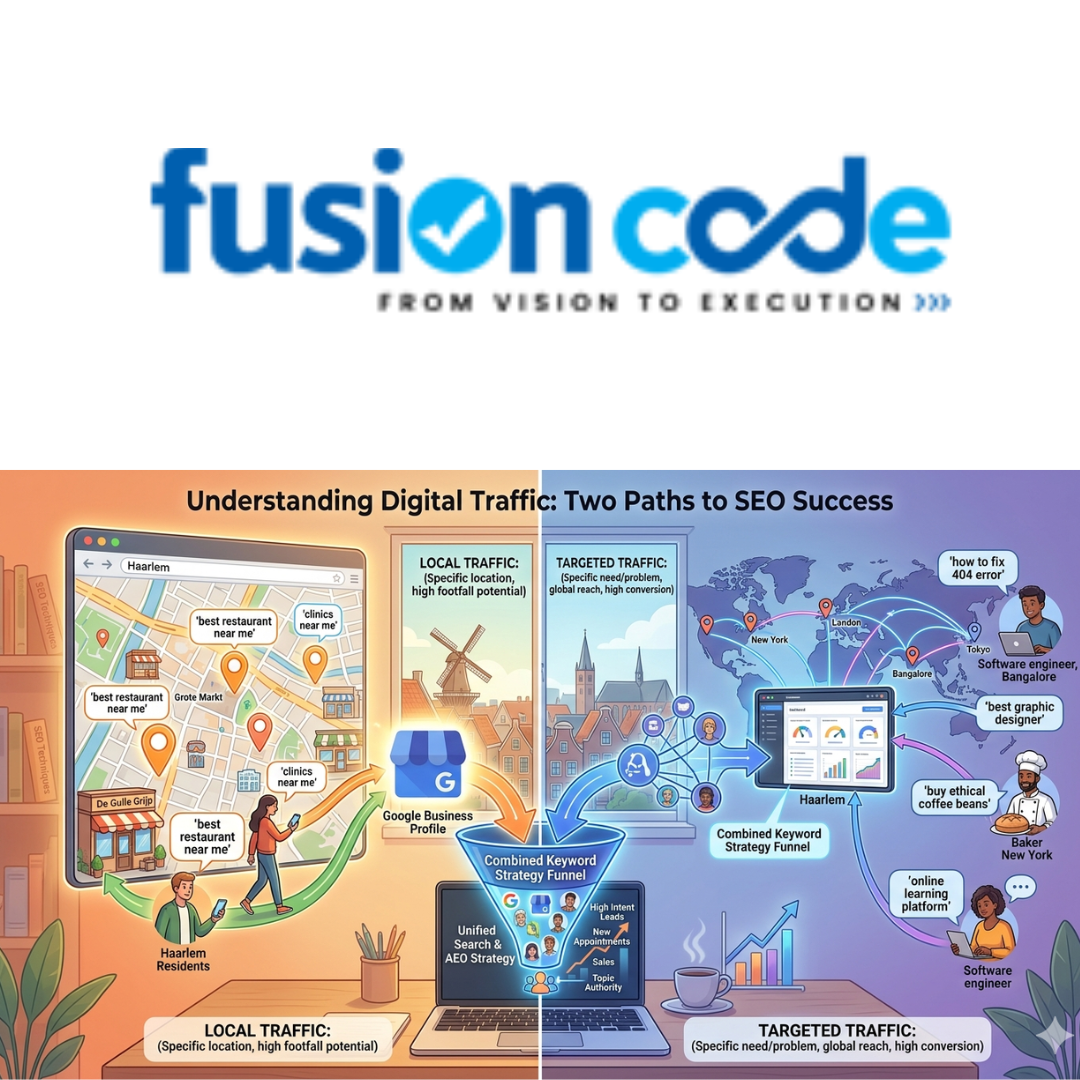
These two types of traffic are different, and understanding both will help you build a smarter keyword strategy.
Local traffic comes from people searching within a specific city, neighbourhood, or region. Keywords include location names like “near me” or “in Delhi. “This type of traffic is essential for businesses like restaurants, clinics, salons, and any local service provider. The foundation of local traffic is a well-optimised Google Business Profile (https://business.google.com).
Example local keyword: “best dentist in Lajpat Nagar Delhi”
Targeted traffic comes from people with a very specific need or problem, regardless of where they are located. These visitors usually have a clear goal in mind and convert at a higher rate than general visitors.
Example targeted keyword: “how to fix 404 errors in WordPress”
The best keyword strategy combines both. A local business still benefits from helpful, intent-driven blog content. An online business can create location-specific pages to capture demand from key cities or regions.
7. AEO vs SEO, how AI search is changing everything
Until recently, the goal of SEO was straightforward. Rank high on Google, get clicks, and get traffic. But AI tools like ChatGPT, Google AI Overviews, Perplexity, and Microsoft Copilot are now answering questions directly, without users ever clicking a link.
This is where Answer Engine Optimization, or AEO, comes in.
| Factor | SEO, Traditional | AEO, Answer Engine Optimization |
| Primary Goal | Rank high on Google | Get cited in AI-generated answers |
| Content Format | Long-form blog posts | Direct answers, Q&A format |
| Key Signal | Backlinks and page authority | Accuracy, trust, entity recognition |
| Technical Focus | Title tags and meta descriptions | Schema markup and structured data |
| Keyword Type | Search-volume-driven keywords | Question keywords, conversational phrases |
| Measurement | Rankings and organic clicks | AI citations and featured snippets |
How does AI search work?
When you type a question into ChatGPT, the AI draws from its training data, which is a massive dataset of web content and structured knowledge. It generates an answer based on that training and sometimes cites sources it considers trustworthy and authoritative.
Tools like Perplexity and Bing Copilot browse live web pages in real time, which means that regular SEO still matters for those platforms. Either way, having well-structured, accurate, and clearly written content is more important than ever before.
Read Also: Best Software Development Company in Lucknow? Here Is What You Should Actually Look For
8. Google Knowledge Graph, schema markup and entity-based SEO
What is the Google Knowledge Graph?
The Google Knowledge Graph is a large database of facts that Google has built about real-world entities, including people, places, companies, and concepts, as well as the relationships between them. When you search a celebrity’s name and see a panel on the right side of the results page with their photo, job title, and biography, that is the knowledge graph working in the background.
Getting your brand recognised as an entity in the Knowledge Graph means that Google and AI systems understand who you are and what you do, even when your name is not mentioned directly. You can read Google’s original overview at: https://blog.google/products/search/introducing-knowledge-graph-things-not/
What is schema markup?
Schema markup is a small piece of structured code that you add to your website to help search engines understand your content better. It is defined by Schema.org (https://schema.org), a shared standard created by Google, Bing, Yahoo, and Yandex.
The most useful schema types for AI and SEO are:
- FAQ Page: marks your question and answer content so AI tools can quote your answers directly
- HowTo: for step-by-step guides and tutorials
- Article: signals that your page is editorial content
- Organization or Person: helps establish your entity in the Knowledge Graph
- BreadcrumbList: helps Google understand your site structure
What is semantic SEO?
Semantic SEO is the practice of writing content around topics and meaning rather than just individual keywords. Instead of writing ten thin posts each targeting one keyword, you build one strong pillar page and support it with related cluster pages, all linked together. This signals to Google that your website is a genuine authority on the topic.
Google’s algorithms, especially after the Hummingbird and BERT updates, are designed to understand meaning and context, not just exact keyword phrases. Writing for semantic search means covering a topic thoroughly and connecting related ideas clearly.
What is GraphRAG?
GraphRAG stands for Graph Retrieval-Augmented Generation. It is an advanced technique used in AI systems where, instead of just pulling text passages to answer a question, the AI maps out the relationships between entities and uses that structure to generate more accurate and connected answers.
For content creators, this means that if your content clearly defines concepts, explains how they relate to each other, and uses consistent language throughout, AI systems that use GraphRAG are more likely to treat your content as a reliable and citable source. Microsoft has published research on this at: https://microsoft.github.io/graphrag/
9. How to get cited by ChatGPT, Perplexity and AI tools
This is the question that every content creator and SEO professional is asking right now. There is no single guaranteed method, but the following strategies make it significantly more likely.
Build topical authority
Do not write one article about a topic and move on. Build a library of deeply related content. The more thoroughly you cover a subject across multiple pages, the more AI systems recognise you as an expert and trustworthy source.
Write direct and clear answers to questions
Structure your content so it answers specific questions plainly and directly. Use your headings as actual questions, for example. “What is keyword difficulty?” AI tools are built to find clear answers, so make yours easy to extract.
Earn mentions from authoritative websites
If well-known publications, Wikipedia, or respected industry blogs link to or mention your content, it is far more likely to appear in AI training data and real-time AI search results. Building backlinks from trusted sources remains one of the strongest signals of credibility.
Add schema markup, especially FAQPage
FAQPage schema formats your content as clean question-and-answer pairs, which are exactly the format that AI systems are most likely to quote from. The HowTo schema works very well for process-based and tutorial content.
Establish your brand as a recognized entity
Make sure your organisation has the following:
- A verified Google Business Profile (https://business.google.com)
- Consistent name, address, and contact details across the entire web
- A Wikidata entry if applicable (https://www.wikidata.org)
- A clear and factual About page on your website
This is what Google Knowledge Graph optimisation actually looks like in practice.
Keep your content accurate and regularly updated
AI models prefer to cite accurate and current information. Update your important pages regularly, correct any outdated statistics, and add a “last updated” date to signal freshness to both Google and AI crawlers.
Honest note: You cannot directly submit your content to ChatGPT’s training data because OpenAI’s training has a cutoff date. However, Perplexity, Bing Copilot, and Google AI Overviews do browse live pages, so current and well-optimised content absolutely still matters for those platforms.
10. Final keyword research checklist
Use this every time you plan or create a new piece of content.
| S.No | Task | Why It Matters |
| 1 | Define your topic and seed keywords | Gives you a clear starting point |
| 2 | Use a keyword tool to find suggestions | Gives you real data instead of guesses |
| 3 | Check the search volume for each keyword | Confirms there is actual demand |
| 4 | Check keyword difficulty; target below 30 if you are new | Helps you pick realistic targets |
| 5 | Find long-tail keyword variations | Lower competition and higher intent |
| 6 | Add LSI keywords using related searches | Helps Google understand the full topic |
| 7 | Confirm the search intent behind your keyword | Makes sure your content matches what users want |
| 8 | Check whether the keyword has local intent | Helps you capture local traffic where relevant |
| 9 | Add schema markup such as FAQ, Article, or HowTo | Boosts AI citations and rich results in Google |
| 10 | Build internal links to related pages on your site | Signals topic authority to search engines |
| 11 | Update the page every six to twelve months | Keeps content fresh for Google and AI tools |